Introduction
.jpg)
My course on interaction design involved the creation of an informative digital poster about LIGO, the Laser Interferometer Gravitational Wave Observatory in Livingston, LA. LIGO is the National Science Foundation's largest project, responsible for the detection of gravitational waves, ripples in spacetime caused by colliding black holes. The poster needed to be suitable for single or multi-user interactive exhibits, or for a presenter speaking to an audience of varying sizes. The LIGO poster has four main sections:
- Home - an introductory page
- Slides - a slideshow of information about LIGO
- Videos - a set of three videos about LIGO
- Black Hole Viewer - an interactive black hole simulation

TouchOSC and OSCHelper
One way users can interact with the poster is through a mobile device using TouchOSC, a modular control surface application that can send and recieve OSC messages (Open Sound Control, a protocol for networking multimedia devices, traditionally sound equipment) over a network. A layout for the poster controls was created in TouchOSC Editor, and is designed for use on a smartphone. You can view the three main layout pages in the gallery below.
On the home page, the user can select one of the other poster sections, changing the content on the 4k screen and switching to a new TouchOSC page with appropriate controls for that panel. The phone sends and receives messages through designated ports on the local network, and communicates with the poster through the Java OSC library. A custom OSC helper class was created to manage listeners, parse incoming OSC messages, and send OSC messages back to the mobile device as event feedback. All classes share a global OSC message receiver, but each class that needs to send messages instantiates its own OSCHelper object.
package ligo;

import com.illposed.osc.*;
import java.io.IOException;
import java.net.InetAddress;
import java.net.SocketException;
import java.util.*;

/**
 *
 * @author Carl
 */
public abstract class OSCHelper {
    public static final String CLIENTIP="192.168.0.100";
    public static final int INPORT=8000;
    public static final int OUTPORT=9000;
    public static OSCPortIn receiver;
    public OSCPortOut sender;

    public static void initialize() throws SocketException {
        receiver= new OSCPortIn(INPORT);
    }

    public OSCHelper(int pageNumber) throws Exception {
        sender=new OSCPortOut(InetAddress.getByName(CLIENTIP),OUTPORT);

        switch (pageNumber) {
            case 1: addHomeListeners(); break;
            case 2: addVideoListeners(); break;
            case 3: addSlidesListeners(); break;
        }
    }

    private void addHomeListeners() {
        receiver.addListener("/2/home",(Date time, OSCMessage message) -> {pushCallback(message,"/2/home");});
        receiver.addListener("/3/home",(Date time, OSCMessage message) -> {pushCallback(message,"/3/home");});
        receiver.addListener("/4/home",(Date time, OSCMessage message) -> {pushCallback(message,"/4/home");});
        receiver.addListener("/1/videos",(Date time, OSCMessage message) -> {pushCallback(message,"/1/videos");});
        receiver.addListener("/1/slides",(Date time, OSCMessage message) -> {pushCallback(message,"/1/slides");});
        receiver.addListener("/1/blackhole",(Date time, OSCMessage message) -> {pushCallback(message,"/1/blackhole");});
    }

    private void addVideoListeners() {
        resetValue("/2/seek");
        setValue("/2/lblPause","Pause");
        setValue("/2/volume",new Float(0.5));
        setValue("/2/indicateChirp","|");
        clearLabel("/2/indicateLaser");
        clearLabel("/2/indicateAbout");

        receiver.addListener("/2/pause",(Date time, OSCMessage message) -> {pushCallback(message,"/2/pause");});
        receiver.addListener("/2/chirp",(Date time, OSCMessage message) -> {pushCallback(message,"/2/chirp");});
        receiver.addListener("/2/laser",(Date time, OSCMessage message) -> {pushCallback(message,"/2/laser");});
        receiver.addListener("/2/about",(Date time, OSCMessage message) -> {pushCallback(message,"/2/about");});
        receiver.addListener("/2/restart",(Date time, OSCMessage message) -> {pushCallback(message,"/2/restart");});
        receiver.addListener("/2/volume",(Date time, OSCMessage message) -> {rotaryChanged("/2/volume",getData(message));});
        receiver.addListener("/2/seek",(Date time, OSCMessage message) -> {faderChanged("/2/seek",getData(message));});
    }

    private void addSlidesListeners() {
        resetValue("/3/seek");
        resetValue("/3/auto");
        resetValue("/3/loop");

        receiver.addListener("/3/next",(Date time, OSCMessage message) -> {pushCallback(message,"/3/next");});
        receiver.addListener("/3/previous",(Date time, OSCMessage message) -> {pushCallback(message,"/3/previous");});
        receiver.addListener("/3/restart",(Date time, OSCMessage message) -> {pushCallback(message,"/3/restart");});
        receiver.addListener("/3/auto",(Date time, OSCMessage message) -> {toggleCallback(message,"/3/auto");});
        receiver.addListener("/3/loop",(Date time, OSCMessage message) -> {toggleCallback(message,"/3/loop");});
        receiver.addListener("/3/seek",(Date time, OSCMessage message) -> {faderChanged("/3/seek",getData(message));});
    }

    public void startListening() {
        receiver.startListening();
    }

    private float getData(OSCMessage message) {
        return Float.valueOf(message.getArguments()[0].toString());
    }

    private void pushCallback(OSCMessage message,String name) {
        if (getData(message)==1)
            buttonPressed(name);
        else
            buttonReleased(name);
    }

    private void toggleCallback(OSCMessage message,String name) {
        if (getData(message)==1)
            setValue(name);
        else
            resetValue(name);
    }

    public void setValue(String name,Object o) {
        try {
           OSCMessage message = new OSCMessage(name,new Object[]{o});
           sender.send(message);
        } catch (IOException ex) {}
    }

    public void switchToPage(int page) {
        setValue("/"+page+"/",1);
    }
    public void setValue(String name) {
        setValue(name,1);
    }

    public void resetValue(String name) {
        setValue(name,0);
    }

    public void clearLabel(String name) {
        setValue(name,"");
    }

    protected void buttonPressed(String name) {}
    protected void buttonReleased(String name) {}
    protected void toggledOn(String name) {}
    protected void toggledOff(String name) {}

    protected void faderChanged(String name,float f) {}
    protected void rotaryChanged(String name,float f) {}
}
JInput and GamepadListener
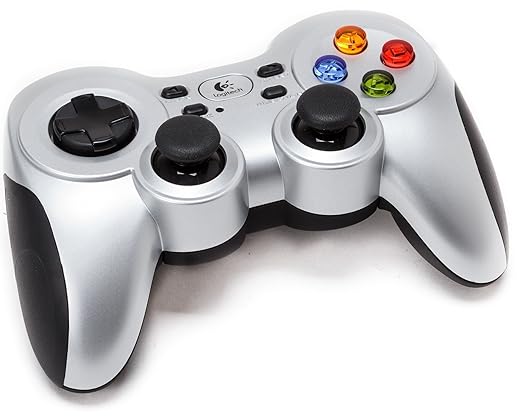
Another way users can interact with the poster is through a Logitech Y710 wireless gamepad, which connects via USB dongle and allows for the same functionality as the TouchOSC-enabled smartphone. The only controls constant across the entire program are the up and down buttons on the D-pad, which allow the user to switch between the four content panels. The behavior of the two joysticks and all other gamepad buttons changes depending on the active panel. The GamepadListener class uses a Java library called JInput for accessing joystick input. It runs on its own thread and is responsible for identifying the Logitech controller, listening for input, parsing the input, and calling appropriate methods that can be implemented within each panel.
/**
 * Author: Carl Montgomery
 * Date: 3/20/16
 * Purpose: A listener class based on jinput for a Logitech-F710 gamepad
 * Notes: Mode must be set on the physical controller (green indicator light) to avoid mismatch between D-pad and left analog pad assignments
 *        stopListening() must be called to end the listener. Otherwise it will continue checking for changes until the program is terminated or the controller disconnects
 */
package ligo;

//Import jinput
import net.java.games.input.Component;
import net.java.games.input.Controller;
import net.java.games.input.ControllerEnvironment;

//Main  threaded abstract class,
public abstract class GamepadListener extends Thread{
    //Enums
    public enum Button {X,A,B,Y,LB,RB,LT,RT,BACK,START,L_ANALOG,R_ANALOG,LEFT,RIGHT,UP,DOWN}
    public enum Direction {CLOCKWISE,COUNTERCLOCKWISE,TO_NEUTRAL,FROM_NEUTRAL}
    public enum Axis {X,Y}

    public String controllerName="Logitech Cordless RumblePad 2"; //Default name for the gamepad
    public boolean[] pressed=new boolean[12]; //Booleans to keep track of numbered button states
    public boolean rightPressed=false,leftPressed=false,upPressed=false,downPressed=false;   //Booleans for D-pad button states
    public float rStickX=0,rStickY=0,lStickValue=0; //Previous values for left and right analog sticks
    public boolean paused;

    //Set controller name (changed from default)
    public void setControllerName(String name) {
        controllerName=name;
    }

    public void startListening() {
        start();
    }

    //Stop listening for controller changes, ie interupt the thread and break the main loop
    public void stopListening() {
       interrupt();
    }

    public void pauseListening() {
       paused=true;
    }

    public void resumeListening() {
        paused=false;
    }

    //Runs when the constructor calls for the thread to begin
    @Override public void run() {
        float data;
        Button button;
        String componentName;
        boolean alreadyPressed;
        int nameVal;


        //Find controller
        Controller controller=null;

        for (Controller c : ControllerEnvironment.getDefaultEnvironment().getControllers())
            if (c.getName().equals(controllerName)) controller = c;


        if (controller == null) {
            System.out.println("Controller not found.");
        }else {
            Component[] components = controller.getComponents(); //Get controller components

            //Loop until the thread is interupted
            while (!isInterrupted()) {
                if (!paused) {
                    //Poll the controller's values, end loop if controller is disconnected
                    if(!controller.poll()){
                        System.out.println("Controller disconnected...");
                        break;
                    }

                    //Iterate through each component
                    for (Component component : components) {
                        data=component.getPollData();
                        componentName=component.getIdentifier().getName(); //Get current component name

                        //Handle numbered buttons
                        if(componentName.matches("^[0-9]*$")){
                            nameVal=Integer.valueOf(componentName);
                            alreadyPressed=pressed[nameVal]; //Determine if the button was previously logged as pressed
                            button=Button.values()[nameVal]; //Get a coorresponding button enum

                            if (data==1) { //Get poll value and determine if the button is currently pressed
                                if (!alreadyPressed) { //Button pressed has not already been called
                                    pressed[nameVal]=true; //Log this button as pressed
                                    buttonPressed(button); //Inititalize button press event
                                }
                            }else if (alreadyPressed) { //Button pressed was previously called
                                pressed[nameVal]=false; //Log this button as not pressed
                                buttonReleased(button); //Initialize button release event
                            }
                        }

                        //Handle all other components (D-pad and joystick/analog pads)
                        switch (componentName) {
                            case "x"   : handleDPadX(data);   break;
                            case "y"   : handleDPadY(data);   break;
                            case "z"   : handleRStickX(data); break;
                            case "rz"  : handleRStickY(data); break;
                            case "pov" : handleLStick(component.getPollData());
                        }
                    }
                }
            }
        }
    }

    //Handle values for the left analog stick
    private void handleLStick(float pollData) {
        if (pollData!=lStickValue) { //Use poll data and previous value to determine if the left analog has changed
            lStickChanged(pollData,analogDirection(lStickValue,pollData));
            lStickValue=pollData; //Log poll data value
        }
    }

    //Handle the x-axis values of the right analog stick
    private void handleRStickX(float pollData) {
        if (pollData!=rStickX) { //Ensure the x-axis value has changed and is above the required threshold
            rStickX=pollData;  //Log poll data value
            rStickXChanged(pollData);
        }
    }

    //Handle the y-axis values of the right analog stick (same as x-axis above)
    private void handleRStickY(float pollData) {
        if (pollData!=rStickY) {
            rStickY=pollData;
            rStickYChanged(pollData);
        }
    }

    //Handle the x-axis values for the D-pad
    private void handleDPadX(float pollData) {
        switch ((int)pollData) {
            case 1: //Right button is pressed
                if (!rightPressed) {
                    rightPressed=true;
                    buttonPressed(Button.RIGHT);
                }
                break;
            case -1: //Left button is pressed
                if (!leftPressed) {
                    leftPressed=true;
                    buttonPressed(Button.LEFT);
                }
                break;
            default: //Neither left nor right button is pressed
                if (rightPressed) {
                    rightPressed=false;
                    buttonReleased(Button.RIGHT);
                }else if (leftPressed) {
                    leftPressed=false;
                    buttonReleased(Button.LEFT);
                }
        }
    }

    //Handle the y-axis values for the D-pad (same as x-axis above)
    private void handleDPadY(float pollData) {
        switch ((int)pollData) {
            case 1:
                if (!downPressed) {
                    downPressed=true;
                    buttonPressed(Button.DOWN);
                }
                break;
            case -1:
                if (!upPressed) {
                    upPressed=true;
                    buttonPressed(Button.UP);
                }
                break;
            default:
                if (downPressed) {
                    downPressed=false;
                    buttonReleased(Button.DOWN);
                }else if (upPressed) {
                    upPressed=false;
                    buttonReleased(Button.UP);
                }
        }
    }

    //Determines the direction of the left analog stick's movement, based on a pervious poll value and the current
    public Direction analogDirection(float f1, float f2) {
        boolean resetBackward=(f1==1.0 && f2==0.125);
        boolean resetForward=(f1==0.125 && f2==1.0);

        if (f1==0)
            return Direction.FROM_NEUTRAL;
        else if (f2==0)
            return Direction.TO_NEUTRAL;
        else if ((f1 > f2 || resetForward) && !resetBackward)
            return Direction.COUNTERCLOCKWISE;
        else if (f1 < f2 || resetBackward)
            return Direction.CLOCKWISE;

        return null;
    }

    //Implementable methods that accept a button enum (including D-pad: left, right, up, and down), called when the button is pressed or relased
    protected void buttonPressed(Button b) {}
    protected void buttonReleased(Button b) {}

    /** Implementable method that accepts a float (0.0 to 1.0) representing the direction of the left analog stick
     * 1.0=West     0.124=Northwest
     * 0.25=North   0.375=Northeast
     * 0.25=North   0.375=Northeast
     * 0.5=East     0.625=Southeast
     * 0.75=South   0.875=Southwest
     * 0.0=Center
     *
     * @param f
     * @param d
     */
    protected void lStickChanged(float f,Direction d) {}

    /** Implementable methods that accept a float (-1.0 to 1.0) representing the position of the right analog stick
     * x-axis 1.0=Right-most
     * x-axis -1.0=Left-most
     * y-axis 1.0=Lowest
     * y-axis -1.0=Highest
     *
     * @param f
     */
    protected  void rStickXChanged(float f) {}
    protected  void rStickYChanged(float f) {}
}
Main Class
This class loads the program, adding the main swing panel and making it visible in fullscreen, and initializing OSCHelper, which creates the OSC message receiver.
package ligo;

import java.awt.*;
import javax.swing.*;

public class Ligo {
    public static void main(String [] args) throws Exception {
        GraphicsDevice device=GraphicsEnvironment.getLocalGraphicsEnvironment().getDefaultScreenDevice();
        OSCHelper.initialize();
        Frame mainFrame=new JFrame();
        mainFrame.add(new MainPanel());
        device.setFullScreenWindow(mainFrame);
        mainFrame.setVisible(true);
    }
}
Framework: MainPanel and NavPanel

The main panel is an invisible container that displays all content and manages its layout. It handles the pausing and resuming of the four different content panels and switches between them seamlessly. The NavPanel class extends JFXPanel, allowing JavaFX components to be used within the poster, including icons with the names of the four content panels that the user can choose from. The currently active panel is always enlarged, and the Home panel loads first by default. A NavPanel object within MainPanelremains visible on the left-hand side of the screen at all times. NavPanel objects also listen for an escape keypress to terminate the program, since the poster runs in fullscreen.
package ligo;

import java.awt.*;

/**
 *
 * @author Carl
 */
public class MainPanel extends Panel{
    public static int screenWidth,screenHeight,mainWidth,mainHeight;

    public BlackHolePanel blackHolePanel;
    public HomePanel homePanel;
    public NavPanel navPanel;
    public VideoPanel videoPanel;
    public SlidesPanel slidesPanel;
    public Panel contentPanel;

    public OSCHelper osch;
    public String currentPanel="home";

    public boolean bhpHelpShown=false, videoHelpShown=false,slidesHelpShown=false;

    public MainPanel() throws Exception{
        Dimension screenSize = Toolkit.getDefaultToolkit().getScreenSize();
        screenWidth=screenSize.width;
        screenHeight=screenSize.height;
        addGamepadListener();
        addOSCListeners();
        buildGUI();
    }

    private void buildGUI() throws Exception{
        setSize(screenWidth,screenHeight);
        setBackground(Color.black);

        contentPanel=new Panel(new CardLayout());
        contentPanel.add(homePanel=new HomePanel(),"homePanel");
        contentPanel.add(videoPanel=new VideoPanel(),"videoPanel");
        contentPanel.add(slidesPanel=new SlidesPanel(),"slidesPanel");
        contentPanel.add(blackHolePanel=new BlackHolePanel(),"blackHolePanel");

        add(navPanel=new NavPanel(),BorderLayout.WEST);
        add(contentPanel,BorderLayout.CENTER);

        homePanel();
    }

    private void addGamepadListener() {
        new GamepadListener(){
            @Override protected void buttonPressed(Button b){
                switch(b) {
                    case UP:
                        switch (currentPanel) {
                            case "home"       : blackHolePanel(); break;
                            case "video"      : homePanel();      break;
                            case "slides"     : videoPanel();     break;
                            case "black hole" : slidesPanel();
                        }
                        break;
                    case DOWN:
                        switch (currentPanel) {
                            case "home"       : videoPanel();     break;
                            case "video"      : slidesPanel();    break;
                            case "slides"     : blackHolePanel(); break;
                            case "black hole" : homePanel();
                        }
                }
            }
        }.startListening();
    }

    private void addOSCListeners() throws Exception{
        osch=new OSCHelper(1) {
            @Override protected void buttonPressed(String name) {
                switch (name) {
                    case "/2/home"   : homePanel();   break;
                    case "/3/home"   : homePanel();   break;
                    case "/4/home"   : homePanel();   break;
                    case "/1/videos" : videoPanel();  break;
                    case "/1/slides" : slidesPanel(); break;
                    case "/1/blackhole" : blackHolePanel(); break;
                }
            }
        };

        osch.startListening();
    }

    private void homePanel() {
        currentPanel="home";
        navPanel.selectHome();
        osch.switchToPage(1);

        videoPanel.hold();
        slidesPanel.hold();
        blackHolePanel.hold();

        ((CardLayout) contentPanel.getLayout()).show(contentPanel, "homePanel");
    }

    private void videoPanel() {
        currentPanel="video";
        navPanel.selectVideo();
        osch.switchToPage(2);
        slidesPanel.hold();
        blackHolePanel.hold();

        ((CardLayout) contentPanel.getLayout()).show(contentPanel, "videoPanel");
    }

    private void slidesPanel() {
        currentPanel="slides";
        navPanel.selectSlides();
        osch.switchToPage(3);
        videoPanel.hold();
        blackHolePanel.hold();

        ((CardLayout) contentPanel.getLayout()).show(contentPanel, "slidesPanel");
    }

    private void blackHolePanel() {
        currentPanel="black hole";
        navPanel.selectBlackHole();
        osch.switchToPage(4);

        videoPanel.hold();
        slidesPanel.hold();

        ((CardLayout) contentPanel.getLayout()).show(contentPanel, "blackHolePanel");
    }
}
package ligo;

import java.awt.event.*;
import javafx.embed.swing.JFXPanel;
import javafx.geometry.Pos;
import javafx.scene.Scene;
import javafx.scene.image.ImageView;
import javafx.scene.layout.*;

/**
 *
 * @author Carl
 */
public class NavPanel extends JFXPanel{
    public final double PANEL_RATIO=0.2;
    public final double LABEL_RATIO=0.8;
    public final double SELECTED_RATIO=0.95;
    public final double SPACING_RATIO=0.02;

    ImageView homeLabel,videoLabel,slidesLabel,blackHoleLabel;
    int labelWidth,selectedWidth,selectedHeight,panelWidth,panelHeight,labelGap;

    public NavPanel() {
        scaleDimensions();
        escapeListener();
        buildGUI();
    }

    private void scaleDimensions() {
        panelWidth=(int)(MainPanel.screenWidth*PANEL_RATIO);
        panelHeight=MainPanel.screenHeight;

        labelWidth=(int)(panelWidth*LABEL_RATIO);
        selectedWidth=(int)(panelWidth*SELECTED_RATIO);
        labelGap=(int)(panelHeight*SPACING_RATIO);
    }

    private void escapeListener() {
        addKeyListener(new KeyListener() {
            @Override public void keyPressed(KeyEvent e) {
                if (e.getKeyCode()==KeyEvent.VK_ESCAPE)
                        System.exit(0);
            }
            @Override public void keyReleased(KeyEvent e) {}
            @Override public void keyTyped(KeyEvent e) {}
        });
    }
    private void buildGUI() {
        VBox vBox=new VBox();

        homeLabel=new ImageView(new javafx.scene.image.Image("file:media/home label.png"));
        homeLabel.setPreserveRatio(true);

        videoLabel=new ImageView(new javafx.scene.image.Image("file:media/video label.png"));
        videoLabel.setPreserveRatio(true);

        slidesLabel=new ImageView(new javafx.scene.image.Image("file:media/slides label.png"));
        slidesLabel.setPreserveRatio(true);

        blackHoleLabel=new ImageView(new javafx.scene.image.Image("file:media/black hole label.png"));
        blackHoleLabel.setPreserveRatio(true);

        selectHome();

        vBox.getChildren().addAll(homeLabel,videoLabel,slidesLabel,blackHoleLabel);
        vBox.setStyle("-fx-background-color: black");
        vBox.setSpacing(labelGap);
        vBox.setAlignment(Pos.CENTER);

        setScene(new Scene(vBox,panelWidth,panelHeight));
    }

    public void selectHome() {
        homeLabel.setFitWidth(selectedWidth);
        videoLabel.setFitWidth(labelWidth);
        slidesLabel.setFitWidth(labelWidth);
        blackHoleLabel.setFitWidth(labelWidth);
    }

    public void selectVideo() {
        homeLabel.setFitWidth(labelWidth);
        videoLabel.setFitWidth(selectedWidth);
        slidesLabel.setFitWidth(labelWidth);
        blackHoleLabel.setFitWidth(labelWidth);
    }

    public void selectSlides() {
        homeLabel.setFitWidth(labelWidth);
        videoLabel.setFitWidth(labelWidth);
        slidesLabel.setFitWidth(selectedWidth);
        blackHoleLabel.setFitWidth(labelWidth);
    }

    public void selectBlackHole() {
        homeLabel.setFitWidth(labelWidth);
        videoLabel.setFitWidth(labelWidth);
        slidesLabel.setFitWidth(labelWidth);
        blackHoleLabel.setFitWidth(selectedWidth);
    }
}
HomePanel
The home panel displays a short introduction on Ligo and loads immediately when the poster launches. It only needs to read an image file with the content and resize it to the appropriate width and height.

package ligo;

import java.io.IOException;
import javafx.embed.swing.JFXPanel;
import javafx.scene.Scene;
import javafx.scene.image.Image;
import javafx.scene.image.ImageView;
import javafx.scene.layout.*;

public class HomePanel extends JFXPanel{

    public HomePanel() throws IOException {
        buildGUI();
    }

    private void buildGUI() {
        VBox vBox=new VBox();
        ImageView mainImage=new ImageView(new Image("file:media/home.png"));
        mainImage.setFitWidth(MainPanel.screenWidth);
        mainImage.setFitHeight(MainPanel.screenHeight);
        vBox.getChildren().add(mainImage);
        setScene(new Scene(vBox,800,400));
    }
}
SlidesPanel
The slides panel displays a series of informative slides about LIGO. When the slides panel opens for the first time, a Help screen guides the user on how to use TouchOSC (preferred over the gamepad for this type of content) to switch between different slides, and how to return to the beginning. On the smartphone, the user can scroll through the slides using a progress bar, move forward, move backwards, or restart the slideshow. An Auto toggle button sets the slides to scroll through on a timer. This enables a Loop toggle button that when toggled causes the slideshow to repeat indefinitely. These controls reset if the user reopens the panel. If the user chooses to use the gamepad, they can quickly move backwards and forwards by rotating the right joystick. A set of thumbnails below the displayed slide indicates the current selection.
|
 |
Use the gallery below to get a closer look at the slides, provided by the Ligo Scientific Collaboration.
package ligo;

import java.util.concurrent.*;
import javafx.embed.swing.JFXPanel;
import javafx.geometry.Pos;
import javafx.scene.Scene;
import javafx.scene.image.*;
import javafx.scene.layout.*;

/**
 * Slides Panel
 * @author Carl Montgomery
 */
public class SlidesPanel extends JFXPanel{
    final int AUTO_RATE=10;
    final int PANEL_WIDTH=1000;
    final int PANEL_HEIGHT=800;
    final int TOTAL_SLIDES=10;

    int slideCounter=0,panelWidth,panelHeight,mainImageWidth,mainImageHeight,
        thumbnailWidth,thumbnailGap,selectedWidth,newCounter;
    Image[] slides=new Image[TOTAL_SLIDES];
    ScheduledExecutorService executor;
    boolean auto=false,loop=false,helpOpen=true;
    ImageView mainImage;
    ImageView[] thumbnails=new ImageView[TOTAL_SLIDES];

    GamepadListener gpl;
    OSCHelper osch;

    public SlidesPanel() throws Exception {
        panelWidth=(int)(MainPanel.screenWidth*0.75);
        panelHeight=(int)MainPanel.screenHeight;
        thumbnailWidth=(int)(panelWidth*0.09);
        selectedWidth=(int)(thumbnailWidth*1.5);

        addGamepadListener();
        addOSCListeners();
        showHelp();
    }

    private void showHelp() {
        ImageView help=new ImageView(new Image("file:media/slides_help.png"));
        BorderPane p = new BorderPane();
        help.setPreserveRatio(true);
        help.setFitWidth(panelWidth);
        p.setStyle("-fx-background-color: black");
        p.setCenter(help);
        setScene(new Scene(p,panelWidth,panelHeight));
    }

    public void hold() {
        if (executor!=null) executor.shutdown();
        gpl.pauseListening();
    }

    public void resume() {
        if (auto) autoOn();
        gpl.resumeListening();
    }

    private void buildGUI() {
        for (int i=0; i < TOTAL_SLIDES; i++) {
            Image image=new Image("file:media/slide"+(i+1)+".png");
            slides[i]=image;
            thumbnails[i]=new ImageView(image);
            thumbnails[i].setPreserveRatio(true);
            thumbnails[i].setFitWidth(thumbnailWidth);
        }

        thumbnails[0].setFitWidth(selectedWidth);

        VBox vBox=new VBox();
        vBox.setSpacing(panelHeight*0.1);
        vBox.setAlignment(Pos.CENTER);
        vBox.setStyle("-fx-background-color: black");

        HBox thumbnailBox=new HBox();
        thumbnailBox.getChildren().addAll(thumbnails);
        thumbnailBox.setSpacing((int)(thumbnailWidth*0.1));
        thumbnailBox.setAlignment(Pos.CENTER);

        mainImage=new ImageView(slides[slideCounter]);
        mainImage.setPreserveRatio(true);
        mainImage.setFitWidth((int)(panelWidth*0.75));

        vBox.getChildren().addAll(mainImage,thumbnailBox);
        setScene(new Scene(vBox,panelWidth,panelHeight));
        resume();
    }


    private void addOSCListeners() throws Exception{
        osch=new OSCHelper(3) {
            @Override protected void buttonPressed(String name) {
                if (helpOpen) {
                    helpOpen=false;
                    buildGUI();
                }else {
                    switch (name) {
                        case "/3/next": next(); break;
                        case "/3/previous": previous(); break;
                        case "/3/restart": restart(); break;
                    }
                }
            }

            @Override protected void toggledOn(String name) {
                switch (name) {
                    case "/3/auto": autoOn(); break;
                    case "/3/loop": loopOn();
                }
            }

            @Override protected void toggledOff(String name) {
                switch (name) {
                    case "/3/auto": autoOff(); break;
                    case "/3/loop": loop=false;
                }
            }

            @Override protected void faderChanged(String name,float f) {
                newCounter=Math.round(f*(TOTAL_SLIDES-1));

                if (newCounter!=slideCounter) {
                    slideCounter=newCounter;
                    update();
                }
            }
        };

        osch.startListening();
    }

    private void addGamepadListener() {
        gpl=new GamepadListener(){
            @Override protected void buttonPressed(Button b) {
                switch(b) {
                    case RIGHT : next();     break;
                    case LEFT  : previous(); break;
                    case START : autoOn();   break;
                    case BACK  : restart();
                }
            }

            @Override protected void lStickChanged(float f,Direction d) {
                switch (d) {
                    case CLOCKWISE        : next();     break;
                    case COUNTERCLOCKWISE : previous();
                }
            }
        };

        gpl.startListening();
    }

    private void autoOn() {
        auto=true;
        osch.setValue("/3/auto");

        if (executor!=null) executor.shutdown();
        executor= Executors.newSingleThreadScheduledExecutor();

        executor.scheduleAtFixedRate(() -> {
            slideCounter++;
            if (slideCounter==TOTAL_SLIDES && loop) slideCounter=0;
            update();
        },0,AUTO_RATE,TimeUnit.SECONDS);
    }

    private void loopOn() {
        loop=true;
        autoOn();
    }

    private void autoOff() {
        auto=false;
        osch.resetValue("/3/loop");
        if (executor!=null) executor.shutdown();
    }

    private void next() {
        if (auto) autoOff();
        if (slideCounter0)
            slideCounter--;
        else
            slideCounter=TOTAL_SLIDES-1;

        update();
    }

    private void restart() {
        slideCounter=0;
        update();
    }

    private void update() {
        for (ImageView thumbnail : thumbnails)
            thumbnail.setFitWidth(thumbnailWidth);

        osch.setValue("/3/seek",(float)(slideCounter/(TOTAL_SLIDES - 1)));
        mainImage.setImage(slides[slideCounter]);
        thumbnails[slideCounter].setFitWidth(selectedWidth);
    }
}
VideoPanel
The video panel allows the user to watch three different videos about LIGO. When the video panel opens for the first time, a Help screen guides the user on how to use TouchOSC (preferred over the gamepad for this type of content) to switch videos, play and pause, scrub to different sections of the videos, and control volume. As with all content panels, the controls on the user's phone respond to what happens on screen, for instance the seek bar moving as the video progresses. If the user chooses to use the gamepad, they can fast forward and rewind by rotating the right joystick. A set of thumbnails below the video area indicates which video is selected. Videos are displayed and controlled using the JavaFX media library, and start automatically once loaded.
 |
 |
Use the youtube playlist below to watch these videos, provided by the Ligo Scientific Collaboration.
package ligo;

import java.io.*;
import java.util.concurrent.*;
import javafx.embed.swing.JFXPanel;

import javafx.geometry.*;
import javafx.scene.Scene;
import javafx.scene.control.*;
import javafx.scene.image.*;
import javafx.scene.layout.*;
import javafx.scene.media.*;
import javafx.util.Duration;

/**
 * Video Panel
 * @author Carl Montgomery
 */
public class VideoPanel extends JFXPanel {
    Media video;
    MediaPlayer player;
    MediaView mediaView;
    Slider timeSlider;
    String currentVideo="";
    boolean paused=false,helpOpen=true;
    ScheduledExecutorService executor;

    GamepadListener gpl;
    OSCHelper osch;

    ImageView chirpThumb,laserThumb,aboutThumb,volImage;
    int panelWidth,panelHeight,playerWidth,thumbnailWidth,selectedWidth;

    //Constants
    public final double PANEL_RATIO=0.75;
    public final double PLAYER_RATIO=0.7;
    public final double THUMBNAIL_RATIO=0.08;
    public final double SELECTED_RATIO=0.13;

    final int SPACING=5;
    final int SEEK_REFRESH_RATE=100;
    final int VIDEO_WIDTH=600;
    final int VIDEO_HEIGHT=400;
    final int BTN_WIDTH=150;
    final int PANEL_WIDTH=1000;
    final int PANEL_HEIGHT=800;
    final int THUMBNAIL_SIZE=75;
    final double SEEK_CONST=0.02;

    public VideoPanel() throws Exception {
        mediaView=new MediaView();
        scaleDimensions();
        addGamepadListener();
        addOSCListeners();
        showHelp();
    }

    private void showHelp() {
        ImageView help=new ImageView(new Image("file:media/video_help.png"));
        BorderPane p = new BorderPane();
        help.setPreserveRatio(true);
        help.setFitWidth(panelWidth);
        p.setStyle("-fx-background-color: black");
        p.setCenter(help);
        setScene(new Scene(p,panelWidth,panelHeight));
    }

    private void scaleDimensions() {
        panelWidth=(int)(MainPanel.screenWidth*PANEL_RATIO);
        panelHeight=MainPanel.screenHeight;

        playerWidth=(int)(panelWidth*PLAYER_RATIO);
        thumbnailWidth=(int)(panelWidth*THUMBNAIL_RATIO);
        selectedWidth=(int)(panelWidth*SELECTED_RATIO);
    }

    private void addGamepadListener() {
        gpl=new GamepadListener(){
            @Override protected void buttonPressed(Button b) {
                switch(b) {
                    case RIGHT:
                        switch (currentVideo) {
                            case "chirp": laserVideo(); break;
                            case "laser": aboutVideo(); break;
                            case "about": chirpVideo();
                        }
                        break;
                    case LEFT:
                        switch (currentVideo) {
                            case "chirp": aboutVideo(); break;
                            case "laser": chirpVideo(); break;
                            case "about": laserVideo();
                        }
                        break;
                    case START : togglePause();  break;
                    case BACK  : restartVideo(); break;
                    case B     : toggleMute();   break;


                }
            }

            @Override protected void lStickChanged(float f,Direction d) {
                double totalTime=player.getTotalDuration().toMillis();

                switch (d) {
                    case CLOCKWISE:
                        player.seek(new Duration(getPlayerTime()+totalTime*SEEK_CONST));
                        break;
                    case COUNTERCLOCKWISE:
                        player.seek(new Duration(getPlayerTime()-totalTime*SEEK_CONST));
                        break;
                    case TO_NEUTRAL:
                        player.play();
                        break;
                    case FROM_NEUTRAL:
                        player.pause();
                }
            }
        };

        gpl.startListening();
    }

    private void addOSCListeners() throws Exception{
        osch=new OSCHelper(2) {
            @Override protected void buttonPressed(String name) {
                if (helpOpen) {
                    helpOpen=false;
                    buildGUI();
                }
                else {
                    switch (name) {
                        case "/2/pause"   : togglePause();  break;
                        case "/2/chirp"   : chirpVideo();   break;
                        case "/2/restart" : restartVideo(); break;
                        case "/2/laser"   : laserVideo();   break;
                        case "/2/about"   : aboutVideo();   break;
                    }
                }
            }

            @Override protected void toggledOn(String name) {muteOn();}
            @Override protected void toggledOff(String name) {muteOff();}
            @Override protected void rotaryChanged(String name,float f) {setVolume(f);}
            @Override protected void faderChanged(String name,float f) {seek(f);}
        };

        osch.startListening();
    }

    private void seek(float f) {
        player.pause();
        Duration seekTime=new Duration(f*player.getTotalDuration().toMillis());
        player.seek(seekTime);
        player.play();
    }

    private void setUpVideo(String filepath) {
        if (player != null) player.dispose();
        player=new MediaPlayer(new Media(new File(filepath).toURI().toString()));
        mediaView.setMediaPlayer(player);

        player.setOnReady(() -> {
            if (executor!=null) executor.shutdown();
            executor= Executors.newSingleThreadScheduledExecutor();
            executor.scheduleAtFixedRate(() -> {
                if (!paused) {
                    float percentage=(float)(getPlayerTime()/player.getTotalDuration().toMillis());
                    timeSlider.setValue(percentage*timeSlider.getMax());
                    osch.setValue("/2/seek",percentage);
                }
            },0,SEEK_REFRESH_RATE,TimeUnit.MILLISECONDS);
        });

    }

    private double getPlayerTime() {
        return player.getCurrentTime().toMillis();
    }

    private  void chirpVideo() {
        currentVideo="chirp";
        setUpVideo("media/ligo-chirp.mp4");
        osch.setValue("/2/indicateChirp","|");
        osch.clearLabel("/2/indicateLaser");
        osch.clearLabel("/2/indicateAbout");

        chirpThumb.setFitWidth(selectedWidth);
        laserThumb.setFitWidth(thumbnailWidth);
        aboutThumb.setFitWidth(thumbnailWidth);

        play();
    }

    private  void laserVideo() {
        currentVideo="laser";
        setUpVideo("media/laser.mp4");
        osch.setValue("/2/indicateLaser","|");
        osch.clearLabel("/2/indicateChirp");
        osch.clearLabel("/2/indicateAbout");
        chirpThumb.setFitWidth(thumbnailWidth);
        laserThumb.setFitWidth(selectedWidth);
        aboutThumb.setFitWidth(thumbnailWidth);
        play();
    }

    private void aboutVideo() {
        currentVideo="about";
        setUpVideo("media/about.mp4");
        osch.setValue("/2/indicateAbout","|");
        osch.clearLabel("/2/indicateChirp");
        osch.clearLabel("/2/indicateLaser");
        chirpThumb.setFitWidth(thumbnailWidth);
        laserThumb.setFitWidth(thumbnailWidth);
        aboutThumb.setFitWidth(selectedWidth);
        play();
    }

    private void setVolume(float f) {
        String volPercentage=String.valueOf((int)(f*100))+"%";
        osch.setValue("/1/lblVolPercent",volPercentage);
        player.setVolume(f);
    }

    private void toggleMute() {
        if (player.isMute())
            player.setMute(false);
        else
            player.setMute(true);
    }

    private void muteOn() {
        volImage.setImage(new Image("file:media/mute.png"));
        player.setMute(true);
        osch.setValue("/2/volume",0);
    }

    private void muteOff() {
        volImage.setImage(new Image("file:media/volume.png"));
        player.setMute(false);
        osch.setValue("/2/volume",(float)player.getVolume());
    }

    private  void togglePause() {
        if (paused)
            play();
        else
            pause();
    }

    private  void play() {
        osch.setValue("/2/lblPause","| |");
        player.play();
        paused=false;
    }

    private  void pause() {
        osch.setValue("/2/lblPause",">");
        player.pause();
        paused=true;
    }

    public  void hold() {
        if (!currentVideo.isEmpty()) pause();
        gpl.pauseListening();
    }

    public  void resume() {
        if (currentVideo.isEmpty())
            chirpVideo();
        else
            play();
        gpl.resumeListening();
    }

    private  void restartVideo() {
        player.seek(new Duration(0));
        player.play();
        paused=false;
    }

    private  void buildGUI() {
        mediaView.setPreserveRatio(true);
        mediaView.setFitWidth(playerWidth);

        BorderPane borderPane = new BorderPane();
        borderPane.setStyle("-fx-background-color: black");
        //borderPane.setPadding(new Insets(0,0,0,100));
        borderPane.setMaxSize(panelWidth,panelHeight);
        borderPane.setCenter(mediaView);

        HBox thumbnailBox=new HBox();
        chirpThumb=new ImageView(new Image("file:media/thumb1.png"));
        chirpThumb.setPreserveRatio(true);

        laserThumb=new ImageView(new Image("file:media/thumb2.png"));
        laserThumb.setPreserveRatio(true);

        aboutThumb=new ImageView(new Image("file:media/thumb3.png"));
        aboutThumb.setPreserveRatio(true);

        thumbnailBox.getChildren().addAll(chirpThumb,laserThumb,aboutThumb);
        thumbnailBox.setAlignment(Pos.CENTER);
        thumbnailBox.setSpacing(THUMBNAIL_SIZE/10);

        VBox vBox=new VBox();
        timeSlider=new Slider();
        vBox.getChildren().addAll(timeSlider,thumbnailBox);
        vBox.setSpacing(35);
        borderPane.setBottom(vBox);

        setScene(new Scene(borderPane,panelWidth,panelHeight));
        resume();
    }
}
BlackHolePanel
The black hole panel allows the user to get an idea of what it would look like to enter a black hole, and interact with the gravitational pull. When the black hole panel opens for the first time, a Help screen guides the user on how to use the wireless gamepad, increasing or decreasing the descent rate using the joystick, or switching between two different versions (gridded and non-gridded) using the red B button. Using a smartphone through TouchOSC is not an option. Similar to the video panel, this class uses the JavaFX media library, adjusting the speed of the video according to the user's input. The simulation automatically starts upon loading and repeats when completed. The video content belongs to University of Colorado Boulder professor, Dr. Andrew Hamilton, and is used with permission.
 |
 |
package ligo;

import com.illposed.osc.*;
import java.io.*;
import java.net.InetAddress;
import java.util.concurrent.*;
import javafx.embed.swing.JFXPanel;

import javafx.geometry.*;
import javafx.scene.Scene;
import javafx.scene.image.*;
import javafx.scene.layout.*;
import javafx.scene.media.*;
import javafx.util.Duration;

/**
 * Video Panel
 * @author Carl Montgomery
 */
public class BlackHolePanel extends JFXPanel {
    Media video;
    MediaPlayer player;
    MediaView mediaView;
    String currentVideo="gridded";
    OSCPortOut sender;
    boolean paused=false;
    GamepadListener gpl;
    ScheduledExecutorService executor;
    ImageView griddedThumb,plainThumb;
    OSCHelper[] listeners=new OSCHelper[9];
    int updateCounter=0,tracker=0,panelWidth,panelHeight,playerWidth;

    //Constants
    public final double PANEL_RATIO=0.75;
    public final double PLAYER_RATIO=0.9;
    final double INITIAL_RATE=0.1;

    public BlackHolePanel() throws Exception {
        mediaView=new MediaView();
        panelWidth=(int)(MainPanel.screenWidth*PANEL_RATIO);
        panelHeight=MainPanel.screenHeight;

        playerWidth=(int)(panelWidth*PLAYER_RATIO);
        setUpVideo("media/blackhole-gridded.mp4");
        addGamepadListener();
        buildGUI();
    }

    private void addGamepadListener() {

        gpl=new GamepadListener(){

            @Override protected void buttonPressed(Button b) {
                switch(b) {
                    case A:
                        toggleView();
                        break;
                }
            }

            @Override protected void rStickYChanged(float f) {
                if (f<-0.5)
                    player.setRate(3);
                else if (f>=-0.01 && f<0.01)
                    player.setRate(1);
                else
                    player.setRate(0.33);
            }

        };

        gpl.startListening();
    }

    private void setUpVideo(String filepath){
        double rate;
        Duration time;

        if (player == null) {
            time=Duration.ZERO;
            rate=INITIAL_RATE;
        }else {
            time=player.getCurrentTime();
            rate=player.getRate();
            player.dispose();
        }

        player=new MediaPlayer(new Media(new File(filepath).toURI().toString()));
        player.setStartTime(time);

        player.setOnEndOfMedia(() -> {
            player.seek(Duration.ZERO);
        });

        mediaView.setMediaPlayer(player);
        mediaView.setPreserveRatio(true);
        mediaView.setFitWidth(playerWidth);

        player.play();
        player.setRate(rate);
    }


    private void toggleView() {
        if (currentVideo.equals("gridded")) {
            currentVideo="plain";
            setUpVideo("media/blackhole-plain.mp4");
        }else {
            currentVideo="gridded";
            setUpVideo("media/blackhole-gridded.mp4");
        }
    }

    private void pause() {
        if (!paused) {
            paused=true;
            player.pause();
        }
    }

    private void play() {
        if (paused) {
            paused=false;
            player.play();
        }
    }

    public void hold() {
        pause();
        gpl.pauseListening();
    }

    public void resume() {
        play();
        gpl.resumeListening();
    }

    private void buildGUI() {
        BorderPane borderPane = new BorderPane();
        borderPane.setStyle("-fx-background-color: black");
        borderPane.setPadding(new Insets(0,0,100,0));
        borderPane.setMaxSize(panelWidth,panelHeight);
        borderPane.setCenter(mediaView);
        setScene(new Scene(borderPane,panelWidth,panelHeight));
        play();
    }
}
View the original video Journey into a Schwarzschild Black Hole below on vimeo.
